WindowEffects — Window Animation Framework for RPG Maker MZ
A downloadable asset pack
WindowEffects — Window Animation Framework for RPG Maker MZ
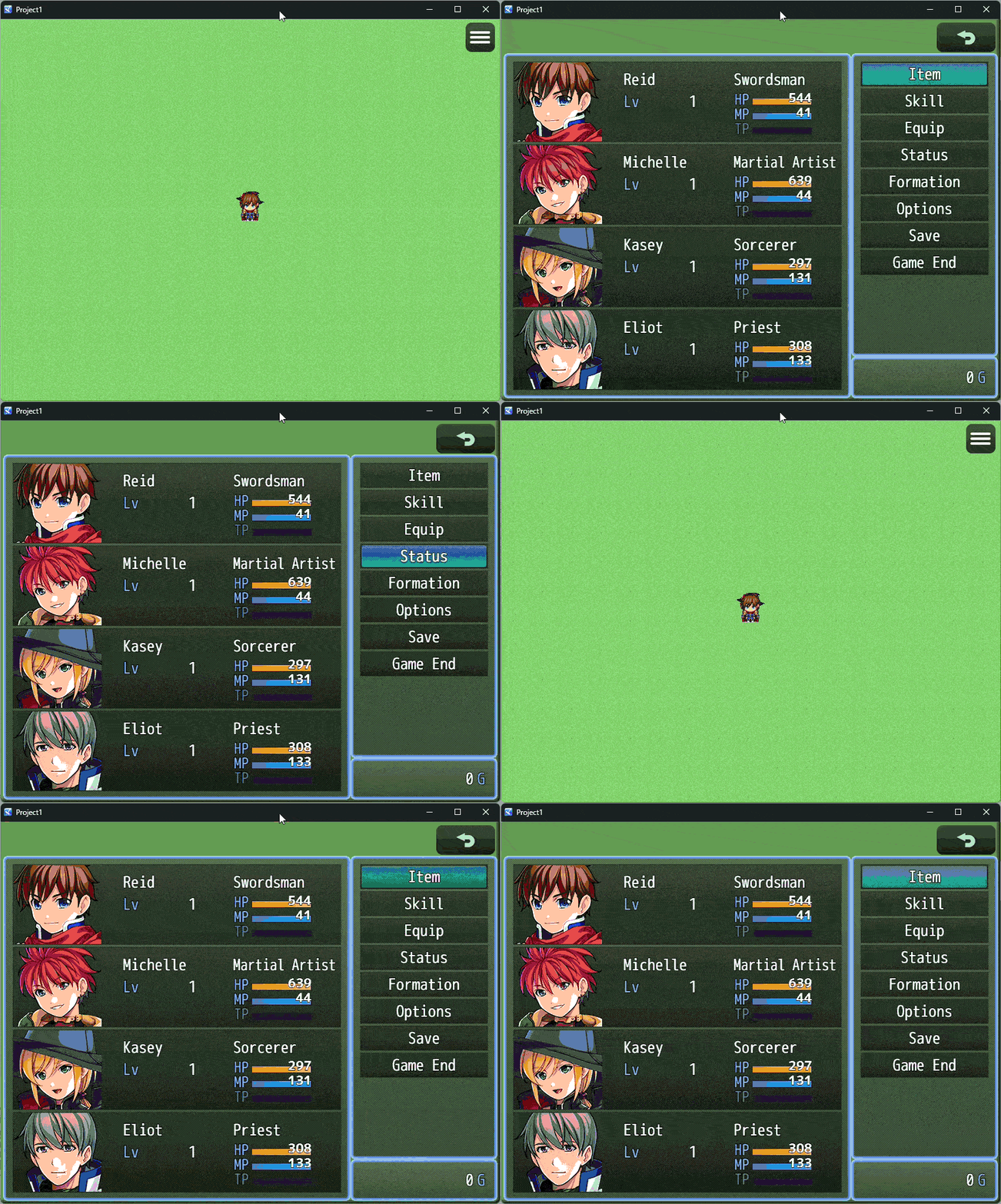
Give every window in your game the polish of a modern UI — without touching a single line of core script.
WindowEffects is a lightweight, reusable animation framework for RPG Maker MZ's Window_* classes. Configure animations once and use them across your entire project — per window class, per instance, or through reusable presets.
✨ FEATURES
- Animate any window: Menus, item lists, choices, messages, shops, battle logs and custom windows.
- 10 built-in effects: fade, slide, scale, pop, bounce, shake, glow, pulse, wobble and none.
- Combinable effects: Combine effects such as fade + scale to create more advanced animations.
- Per-class configuration: Apply an animation to every instance of a window class.
- Per-instance configuration: Apply an effect to a single specific window.
- Reusable presets: Includes
modernPop,smoothSlide,retroandfadeSimple, plus support for your own presets. - 10 easing curves: Including
easeOutBackandeaseOutBounce. - No code required: Configure everything through RPG Maker MZ's Plugin Manager.
- JavaScript API: Optional scripting support for developers who need deeper control.
- Extensible: Register your own custom effects and presets.
🎨 INCLUDED EFFECTS
Fade / FadeIn / FadeOut — Opacity transitions.
Slide / SlideIn / SlideOut — Slide from the top, bottom, left or right.
Scale / ScaleIn / ScaleOut — Scale around the window's center.
Pop — Scale + fade with an easeOutBack overshoot.
Bounce — Slide with an easeOutBounce landing.
Shake — Horizontal shake with decay, ideal for damage and errors.
Glow — Brightness pulse using the window's tone.
Pulse — Gentle breathing scale animation.
Wobble — Small rotation oscillation.
Effects support parameters such as duration, easing, direction, distance, scale, intensity and opacity, with sensible defaults so you can get started quickly.
⚙️ HOW IT WORKS
WindowEffects uses an alias-based approach and does not replace RPG Maker's core window behavior. Methods such as open(), close(), show(), hide(), activate(), deactivate() and update() continue to call the original RPG Maker methods first. Animations are then layered on top using properties such as position, scale, opacity and rotation.
Your windows continue to open, close, receive input and refresh normally — they simply look better while doing it.
Windows that appear without explicitly calling open() are also handled automatically. When a configured window is added to a scene, its enter animation can play automatically.
💻 EXAMPLES
WindowEffects.configure("Window_MenuCommand", "modernPop");
WindowEffects.configure("Window_Message", {
    enter: { effect: "slideIn", direction: "bottom", duration: 20 },
    exit: { effect: "fadeOut", duration: 15 }
});
WindowEffects.apply(this, "modernPop");
WindowEffects.apply(this, {
    enter: {
        effect: ["fade", "scale"],
        duration: 18,
        easing: "easeOutBack"
    }
});
WindowEffects.play(this, "hit", {
    effect: "shake",
    duration: 12,
    intensity: 10
});
⚡ PERFORMANCE & COMPATIBILITY
WindowEffects is designed to be lightweight and compatible with other RPG Maker MZ plugins. It uses no setInterval(), no setTimeout(), no DOM access and avoids unnecessary per-frame allocations. Animation state is created when an effect starts and updated through the window's existing update() loop.
When no animation is playing, the additional per-frame cost is essentially a single state check.
📜 LICENSE
Free for use in commercial and non-commercial RPG Maker MZ projects. Credit is appreciated but not required. If you'd like to give credit, simply mention WindowEffects by Takki in your project credits.
💬 SUPPORT
Found a bug, have a feature request, or want to suggest a new effect? Leave a comment on this page — I read everything.
Thanks for checking out WindowEffects, and happy developing! 🎮✨
Purchase
In order to download this asset pack you must purchase it at or above the minimum price of $1 USD. You will get access to the following files:
Leave a comment
Log in with itch.io to leave a comment.